Recipe Keeper
- 4.7
- Rating
- 1.00M
- Installs
- Free
- Price

 Analysis by App-foxy
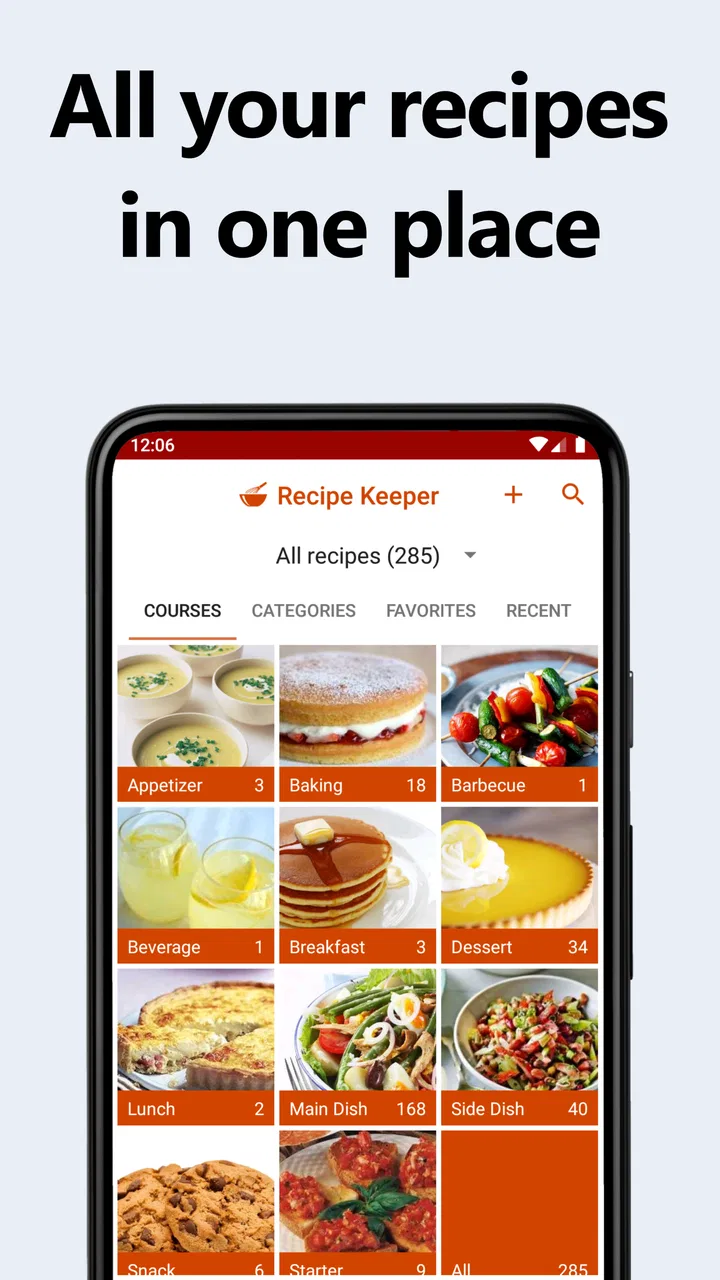
I like recipe apps most when they solve a problem I actually have after the initial excitement wears off. Recipe Keeper caught my attention because it tries to become a practical home-cooking notebook rather than just another stream of attractive meal ideas. It combines recipes, a shopping list, and meal planning, with the useful promise that my information can stay in sync across devices.
That combination makes sense for anyone who cooks from a phone but still plans meals in a more deliberate way. I can save a dish, decide when I want to make it, and turn the ingredients into a shopping task instead of keeping separate notes in several places. The app is free to install, aimed at Everyone, and comes from Tudorspan Limited. It has been around since Nov 10, 2014, which gives it a more established feel than a brand-new cooking tool.
How it feels during the first week
The first week is where the app makes its strongest impression. I can start by entering recipes I already use, bringing together meals that might otherwise be scattered across screenshots, browser bookmarks, handwritten cards, and messages. That is more valuable than it sounds. A recipe collection becomes useful when it reflects what I really cook, not merely what looks appealing while browsing.
You May Also Like

 Blood Strike: 2.5 Anniversary
Blood Strike’s Loadouts Turn Every Drop Into a Tactical Gamble
A close look at Blood Strike’s custom loadouts: how fast access to signature weapons reshapes its battle royale rhythm, rewards preparation, and narrows the gap between fights.

 Pandora - Music & Podcasts
Pandora’s Music Is Easy to Start, but Harder to Recover
Pandora’s strength is its low-effort path from a seed to a station. Its weak spot is how much confidence it asks you to place in connection, setup, and quiet recovery.

 8 Ball Pool
 Is Built on Rivalries, Rematches, and Routine
A close look at the rivalries, rematches, shared routines, and unanswered safety questions that turn a quick pool match into a persistent mobile community.

 Samsung Music
’s Quiet Strength Is Playing What You Already Own
Its reach comes less from spectacle than from dependable access to a personal library. That simplicity is both the app’s strongest retention engine and its ceiling.

 AccuWeather: Weather Radar
AccuWeather Review: A Quick, Clear Forecast for Everyday Decisions
For everyday plans, the best forecast is the one you can understand quickly. AccuWeather makes rain timing, radar, and local conditions easy to act on, with a few trade-offs.

 Hill Climb Racing
Why Hill Climb Racing Still Turns Crashes Into One More Run
A tiny car, a bumpy hill and one more upgrade: Hill Climb Racing keeps resurfacing because its simple chaos makes every near-miss feel personal.
More From Our News Desk



The central experience is straightforward: recipes sit alongside planning and shopping tools. I do not have to remember which note contains the ingredient list or rewrite the same items every time I shop. The app’s store summary describes recipes, shopping lists, and meal planning that sync across devices, and that connected approach is the reason I would choose it over a simple notes app.
A realistic first-week routine would be to add a few dependable dinners, place them across the coming days, and build a shopping list from that plan. I would then check the list while shopping and adjust the plan when an ingredient is unavailable. This workflow is more useful than filling the app with dozens of recipes immediately. The early goal should be to create a small working collection that matches the household’s habits.
I also found that the app’s value depends heavily on how carefully recipes are entered. A vague title such as “pasta dinner” is not enough when I am standing in a supermarket. Clear ingredient names, amounts, serving details, and preparation notes make the later shopping and cooking stages much smoother. The app can organize information, but it cannot rescue a recipe that I recorded carelessly.
For a new user, I would avoid trying to build a perfect digital cookbook in one sitting. Adding five or ten meals that I make repeatedly gives a better sense of the system. It also reveals whether the app fits my way of cooking. Someone who wants instant inspiration without entering or organizing anything may find the first setup more demanding than expected.
The cross-device aspect is especially useful in a household where planning happens in one place and shopping happens in another. I might plan on a larger screen, then use a phone in the kitchen or store. That continuity is the kind of convenience I notice after a few days, not in a quick demonstration.
Recipe Keeper currently sits at a 4.7 average from around 18 thousand ratings, and its audience has passed one million installs. Those figures suggest that the basic idea has found a substantial group of people, but they do not remove the need to test the workflow personally. Recipe management is very individual: one person wants detailed organization, while another wants nothing more than a short list of ingredients.
The small workflow decisions that matter
One of my most useful habits with this kind of app is separating “recipes I want to try” from meals I confidently plan for the week. If every interesting dish is treated as a commitment, the meal planner becomes a source of pressure. I prefer using the collection as a broad library, then selecting a smaller group for actual planning.
Another practical habit is checking the shopping list before leaving home, rather than assuming it is ready automatically. Pantry staples, substitutions, and items already in the refrigerator can make a planned list inaccurate. A quick review prevents buying duplicates and keeps the list connected to real life instead of treating it as an unquestionable instruction.
The app is also a better fit for people who want their recipes to remain usable over time. A saved recipe is not just a picture or a web page; it can become part of a repeatable routine. That distinction matters if I am trying to reduce decision-making on busy evenings.
Why it can keep earning space month after month
The lasting value comes from repetition. After the novelty of collecting recipes fades, I still have a reason to open the app if it helps me answer three ordinary questions: what am I cooking, what do I need, and where is the recipe? The meal-planning and shopping-list connection gives it a chance to become part of that weekly loop.
I would judge the app less by how many recipes I save and more by how often it helps me avoid a last-minute takeaway or an unnecessary supermarket trip. A modest collection of familiar meals can be more valuable than a huge archive. This is where Recipe Keeper feels different from recipe discovery services that encourage browsing but do not necessarily help me follow through.
It can also support changing routines. During a busy week, I might schedule simpler meals and keep more ambitious recipes for a quieter weekend. When plans change, I can revise the schedule instead of abandoning the entire system. That flexibility is important because meal plans fail when they are too rigid for work, family, travel, or unexpected errands.
The shopping list is most useful when I treat it as a planning aid rather than a complete inventory system. I still need to know what I already have and whether a listed ingredient can be replaced. The app can reduce repeated writing and mental load, but it does not know the condition of my pantry unless I keep that information accurate myself.
For families, the synced setup may be one of the strongest reasons to stay with it. A person planning meals at home and another person shopping can work from the same information instead of passing around an outdated message. That does not guarantee perfect coordination, but it removes one common point of friction: the list living on only one person’s phone.
For an individual cook, the benefit is quieter. I can keep personal recipes in one place and build a dependable rotation. This is particularly helpful if I cook from memory but occasionally forget proportions or preparation order. A structured recipe record gives me something more reliable than trying to reconstruct a meal from vague recollection.
The app is not necessarily the best choice for someone who wants a social feed, restaurant recommendations, or a constant supply of professionally produced cooking videos. Its strength is organization around my own recipes and plans. If discovery is the main goal, a dedicated recipe community or video platform may feel more lively.
What maintenance really involves
The maintenance burden is manageable, but it is real. Recipes need occasional cleanup when I change an ingredient, discover a better cooking method, or realize that an amount was missing. Shopping lists also need human judgment. If I never update anything, the collection gradually becomes less trustworthy, and I will stop relying on it.
I recommend reviewing a recipe immediately after cooking it when the details are still fresh. A short note about a substitution, a longer cooking time, or a preferred serving size can save frustration later. This is one of the less obvious ways to get lasting value: the app becomes a record of what worked in my kitchen, not merely a storage box.
Meal planning works best when I keep it realistic. Planning every meal far in advance may look organized, but it creates more maintenance when plans change. I prefer leaving room for leftovers, quick meals, or an unplanned evening. A flexible plan is easier to maintain than an ambitious one that needs constant correction.
There is also a difference between a recipe archive and a working cookbook. An archive can contain anything; a working cookbook should make decisions easier. I would periodically remove duplicates, rename unclear entries, and mark recipes that I no longer intend to make. Even without turning the collection into a formal project, a little editing keeps it useful.
The current version is 3.45.1.0, and the app supports devices running at least Android 5.1. That broad compatibility is helpful for people using older Android hardware, although the experience will still depend on the device and operating system around it. I would also remember that the free app includes in-app purchases priced at $19.99 per item, so anyone considering advanced or paid parts should check the purchase screen carefully before committing.
That pricing detail affects how I evaluate the app. The free starting point makes it easy to see whether the workflow suits me, but I would not build my entire cooking system around assumptions about paid capabilities. I would first enter a small collection, test planning and shopping in ordinary use, and only then decide whether an in-app purchase is worthwhile.
Where fatigue can appear
The biggest source of fatigue is manual organization. If I mostly discover recipes online and expect them to become perfectly structured with no effort, this may feel slower than a browser bookmark folder. The payoff comes later, when the saved recipes are clean enough to use repeatedly. People who dislike entering details may abandon the system before reaching that point.
Another possible frustration is the difference between planning and reality. A meal planner can make a week look orderly, but it cannot account for every change in appetite, schedule, ingredient quality, or energy level. If I treat the plan as a strict obligation, the app may make cooking feel like administration. If I treat it as a flexible suggestion, it becomes much easier to keep using.
Shopping lists can also become cluttered when the same ingredient appears in several recipes or when quantities need interpretation. I would review combined items, check units, and make sure the list reflects what I actually need. This extra step is not a flaw unique to one app; it is the trade-off of turning recipes into a real shopping workflow rather than keeping them as isolated pages.
The app may feel less rewarding for cooks who rarely repeat meals. If every dinner is improvised and recipes are used only once, the organization work has less opportunity to pay back. In that case, a simple notes app or a discovery-focused service could be faster. Recipe Keeper earns its place when I return to recipes and plans often enough for structure to matter.
I would also skip it if my priority is advanced nutrition tracking, grocery delivery integration, or a highly social cooking experience. The app’s identity is centered on personal recipe management, shopping, and planning. Choosing it for features outside that core would likely lead to disappointment.
There is a subtler fatigue problem: collecting can replace cooking. It is easy to spend time importing and arranging recipes while postponing the practical question of what to make tonight. I get better results when every new recipe has a reason to exist, such as fitting a dietary preference, using an ingredient I already own, or replacing a meal in my regular rotation.
Privacy-minded users may also want to think carefully about what they store in any cloud-synced recipe service before making it their only record. I would keep especially important family recipes backed up in another form. That is sensible housekeeping for any digital collection, not a criticism of this particular product.
How it compares with familiar alternatives
Compared with a notes app, Recipe Keeper offers a more cooking-specific structure. Notes are quicker for a single recipe, but they usually leave planning and shopping in separate places. The dedicated workflow is worth the extra organization when I want a recipe to connect directly to the week’s meals.
Compared with a paper cookbook, the app is easier to carry, revise, and use while shopping. Paper still wins for people who prefer a screen-free kitchen or want a physical family archive. I would not replace a treasured handwritten collection entirely; I would use the app for the recipes I need to search, edit, and plan around most often.
Compared with recipe websites and video platforms, it is less about endless discovery and more about personal control. Websites may provide more immediate variety, while this app becomes stronger as my own collection improves. That makes the two approaches complementary: I can discover elsewhere, then keep the recipes I genuinely intend to repeat here.
Compared with a basic shopping-list app, its advantage is the link between ingredients and meals. A standalone list is faster for errands unrelated to cooking, but it does not explain why an item is needed or help me decide what to cook. Recipe Keeper is more useful when the shopping trip begins with a meal plan.
One concrete trade-off is speed versus durability. A quick note may take less time today, but a properly maintained recipe entry can save time across many future cooking sessions. I would choose the app when I expect repetition, shared planning, or gradual improvement of my recipe collection. I would choose something simpler for a one-off meal or a very small list.
My long-term verdict
After the first-week appeal fades, Recipe Keeper still has a credible reason to remain installed: it can turn scattered recipes into a repeatable household routine. The lasting benefit is not the act of saving food ideas. It is the reduced friction between choosing a meal, buying what it requires, and cooking it again later.
My recommendation is strongest for home cooks who repeat favorite dishes, plan at least part of the week, or share shopping responsibilities with someone else. It is also appealing for anyone who wants a personal cookbook that can evolve instead of remaining fixed on paper. The app rewards modest, consistent use more than enthusiastic but disorganized collecting.
I would be more cautious for people who want instant inspiration, extensive social features, or detailed systems outside recipes, lists, and planning. The manual upkeep can feel unnecessary if I rarely cook from recipes or dislike maintaining digital records. In those situations, a note-taking tool, paper notebook, or discovery service may be the better match.
The most successful setup is simple: begin with meals I already trust, write ingredients clearly, plan only what I can realistically cook, and update recipes after using them. That approach keeps the maintenance burden low while making the collection increasingly personal. It also prevents the app from becoming another neglected productivity project.
Recipe Keeper is free to start, rated for Everyone, and developed by Tudorspan Limited. Its long presence and broad user base make it feel like a mature option in the Food & Drink category, while the available paid items mean I would test the everyday workflow before spending anything. For me, the deciding question is not whether it can store recipes; it is whether I will actually use the plan and shopping tools week after week.
My final view is positive, with that condition clearly attached. It earns lasting space when I use it as a working kitchen tool, not as a passive recipe warehouse. If I build a focused collection and keep it lightly maintained, the app can remove small but recurring decisions from cooking. That is a practical benefit, and it is strong enough to outlast the novelty for the right kind of user.
FAQs for Recipe Keeper
01What is Recipe Keeper and how does it work?
Recipe Keeper is a versatile app designed to help users organize, store, and access their favorite recipes. Users can manually enter recipes or import them from websites. The app allows for easy categorization, making it simple to search and find recipes by ingredients, meal type, or dietary preference. It also includes features for meal planning and shopping lists.
02Is Recipe Keeper available on both Android and iOS devices?
Yes, Recipe Keeper is available for download on both Android and iOS platforms. Users can seamlessly sync their recipes across multiple devices, ensuring that their collection is accessible whether they're using a smartphone or tablet. This cross-platform availability makes it a convenient solution for users who switch between different devices.
03Does Recipe Keeper offer any premium features, and are there costs involved?
Recipe Keeper offers a free version with basic features; however, it also provides a premium version that includes additional functionalities such as unlimited cloud storage, advanced search options, and no ads. The premium version typically requires a one-time purchase or subscription, depending on the platform, offering enhanced capabilities for avid cooks.
04Can Recipe Keeper handle dietary restrictions or preferences?
Yes, Recipe Keeper allows users to customize their recipe collections based on various dietary needs. Users can tag recipes according to dietary preferences such as gluten-free, vegetarian, or vegan. This feature is particularly useful for those who need to adhere to specific dietary restrictions, making meal planning more efficient and personalized.
05How user-friendly is Recipe Keeper for beginners?
Recipe Keeper is designed with an intuitive interface that is friendly for beginners. The app offers straightforward navigation and easy-to-use tools for adding and organizing recipes. Additionally, it provides helpful tutorials and customer support to assist new users in getting the most out of the app, ensuring a smooth and enjoyable experience.
Pros
- User-friendly interface for easy navigation.
- Syncs across multiple devices seamlessly.
- Offers meal planning and grocery lists.
- Supports importing recipes from the web.
- Customizable categories for better organization.
Cons
- Limited free version features.
- Occasional syncing issues reported.
- No offline access for web-imported recipes.
- Some users find the search function limited.
- No integration with smart kitchen devices.

Recipe Keeper
Gallery